




With the rise of copyright awareness, people increasingly put watermarks on their works, like images, PDFs, videos. However, a watermark on an image may become a hassle if you want to save a photo as a screen saver or appreciate it. And most of the photo processors on the market cost highly. If you are wondering how to remove watermark from photo without any cost, this article will provide you with several practical ideas. Here is a brief list of the best three free tools that can remove watermark from photo.
- WorkinTool Watermark Eraser
- Apowersoft Watermark Remover
- Inpaint Online Tool
#1 WorkinTool Watermark Eraser
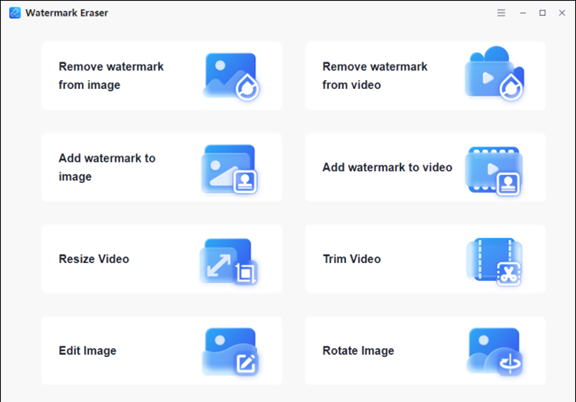
WorkinTool Watermark Eraser is a powerful and efficient watermark-removing software that has been launched recently. You can completely rely on it. It is developed by a leading technology company, which has over ten years of experience in software. What’s more, not only WorkinTool Watermark Eraser is a watermark remover, but it is also an all-in-one watermark processor that can be used for adding watermarks to images or videos, editing images, trimming videos, etc. It is completely FREE without any request. You can use it with ease.
Key Features of WorkinTool Watermark Eraser
Here is a conclusion of its features that you can refer to:
| ✅ Free for all operations | Few offices software can offer such a long-term free trial without any request. But WorkinTool promises to make its products completely free for users. |
| ✅ Easy-to-operate | Its interface is both concise and convenient for users. What’s more, the operation process is smooth and fast. Just in a few seconds, you can get the converted photo. The quality of the new image is ensured as well. |
| ✅ Privacy-guaranteed | Different from many other image processing software, it asks for no registration or login. You don’t need to input your email or phone number either. |
| ✅ User-oriented | This software is totally from the users’ point of view. All their explorers are always aware of what the audiences need, and how to benefit users to an extreme extent. It is viable for you to offer your feedback to their official website after you use it. |
| ✅ High-quality output | You will agree with me that a converted image with terrible quality is annoying. It will not only waste your time but also make you lose patience. WorkinTool, let this never happen. With it, the exporting photo will remain its high quality no matter what format it is. |
How to Use It
- Step1. Open the software then choose “Remove watermark from image”
- Step2. Select an image or drag the image directly.
- Step3. Select the watermark with a box or brush. It is available to see the comparison by clicking “Compare”. After processing, click “Save” to download the converted image. It is viable to deal with multiple watermarks at once time.
Here is the display of the result. As you can see, the quality of the image is ensured. In just a few seconds, you can remove watermark from photo.
#2 Apowersoft Watermark Remover
Apowersoft is a brand developed by LIMITED, a software company located in Hong Kong. They have long been committed to providing simple, high-quality, and creative solutions, data solution software, multimedia software, PDF solutions, diagram software, and utility tools. It started in 2010, since then, they have millions of users from all over the world. Their Apowersoft Watermark Remover fulfills getting rid of watermarks from photos.
Pros & Cons of Apowersoft Watermark Remover |
|
😀 Pros
|
😞 Cons
|
How to Use It
- First, open it then find “Remove watermark from image”.
- Second, upload or drag an image file.
- Third, select watermarks with tools like box, brush, and line. However, you can only select one watermark once a time. Multiply selecting is viable for pro users only.
- Last, change the location of the new image if you want. Then click “Convert”.
#3 Inpaint Online Tool
Inpaint is a photo editor for retouching photos and removing unwanted objects. Inpaint Image Tools focus on photo editing via simplified tools, including online tools and desktop tools. Inpaint can perform other functions as well, like repairing old photos, merging images, restoring photos, etc. As for its online remover, it has both windfalls and handicaps. Here is a summary for you.

Pros & Cons of Inpaint Online Remover |
|
| 😀 Pros | 😞 Cons |
|
|
How to Use It
Step1. Click “Upload Image” or drop your image to convert. However, with an online tool, the size of your image is limited.
Step2. Use the brush, line, or box to highlight the area of the watermark you want to remove.
Step3. Click “Erase” then save the new image by clicking “Download”. However, to download high-quality results, you need to purchase download credits.
Comparison of the Three Tools
| Features/Tools | WorkinTool Watermark Eraser | Apowersoft Watermark Remover | Inpaint Online Tool |
| Cost | Completely free | Free for simple watermark removing | Free for low-quality output |
| Function | multiple | simple | multiple |
| Speed | fast | a little slow | fast |
| Operation | easy | easy | effortless |
| Limit | no | Multiply watermark processing is only for pro users | Photo size is limited
High-quality output needs to download |
Final Thoughts
All the three tools I recommended today can realize remove watermark from photo. They have their features as well. Hope you can find an appropriate watermark eraser after your reading. As regards me, I’d like to choose WorkinTool Watermark Eraser first. One reason is that there is no limit to using it. Different from the others, all its functions are available for new users. Another reason is that, compared with another two, it is more powerful and effective. It not only realizes removing the watermark but also can cope with other image and video issues, like resizing and trimming videos, editing images, adding watermarks to photos and videos.


